
How to Create an AI PDP Framework
An AI PDP Framework defines the structure and criteria AI uses to generate a Personal Development Plan. It guides AI on what to prioritize, how to approach recommendations, and which organizational knowledge or resources to consider.
Learn more about Personal Development Plans ( PDP )
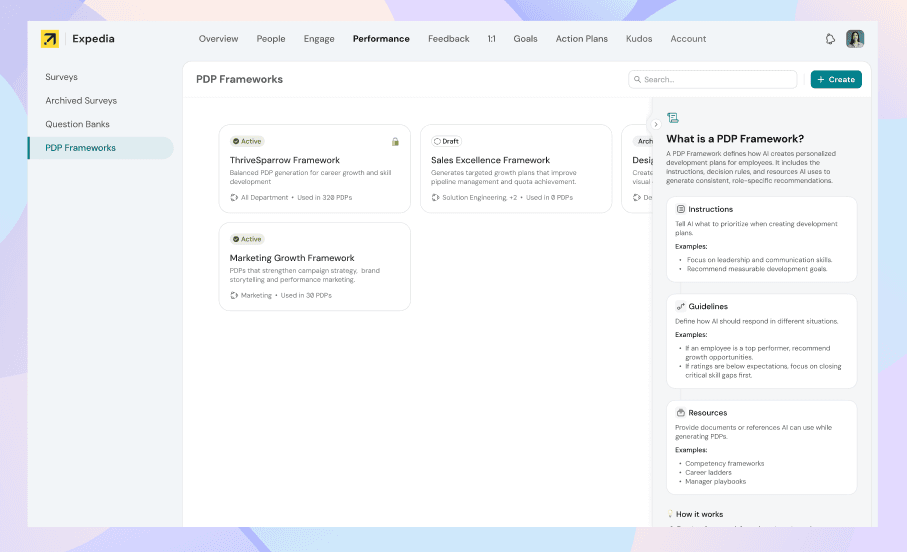
Why Do We Need a PDP Framework?
A PDP Framework gives AI a consistent structure for creating Personal Development Plans across the organization.
It helps ensure that:
- Consistent structure: AI follows the same organization-wide structure when generating PDPs.
- Standardized output: Every PDP is created with a defined set of expectations, sections, and guidelines.
- Better relevance: AI knows what to consider when generating a PDP, resulting in more focused and meaningful development plans.
- Scalable creation: Organizations can generate PDPs for multiple employees while maintaining consistency across all plans.
In short, a PDP Framework defines how AI should structure and generate a PDP, ensuring every plan follows the organization's standards and expectations.
How to Create a PDP Framework
Under Performance Module, you should find a sidebar for PDP Frameworks
Note : By default Thrivesparrow will have few Frameworks predefined for easier access.
You can also create a Custom Framework for your organisation.
Creating Framework using AI
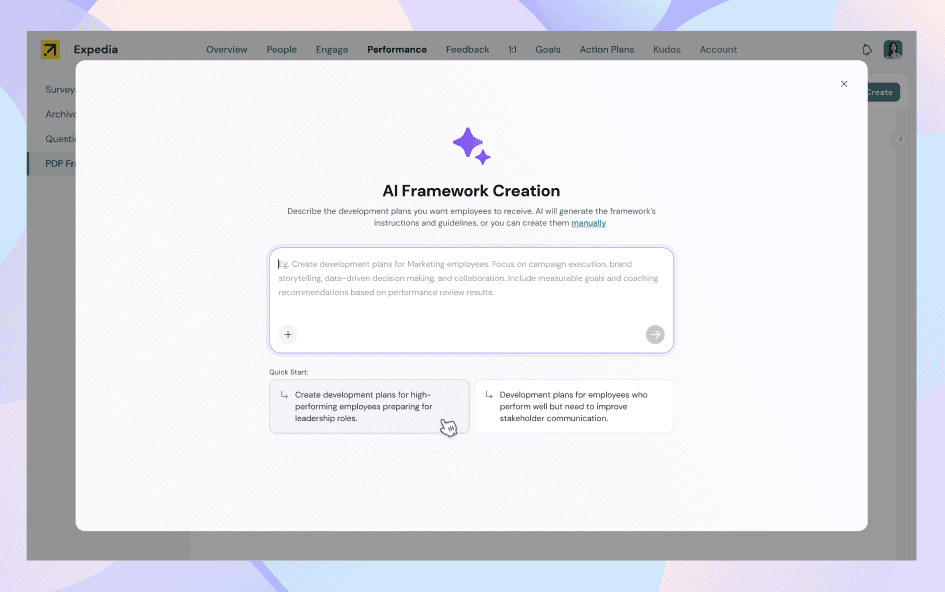
Simply enter your requirements or describe what you want in the input box. ThriveSparrow AI will generate the supporting instructions and guidelines for the framework, giving you a strong starting point that you can review and customize as needed.
- You will have an option to add any sample development plans or instructions of your choice as well for accurate instructions generations.
- If you wish not to use AI, you can also start from scratch and manually create a PDP Framework.
3 Step PDP Framework Creation Process
Step 1: Define Your Framework
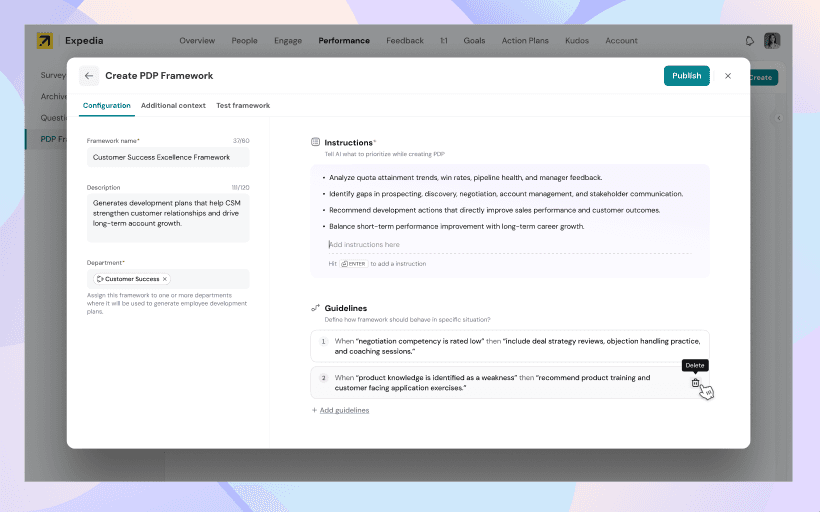
- Add framework details
Enter a name and description for the framework, and select the departments it applies to. - Add instructions
Define what you expect the AI to consider when creating PDPs using this framework. - Add guidelines
Provide specific “when this happens, do this” scenarios to guide the AI in generating relevant and consistent PDPs.
Step 2: Add Supporting Context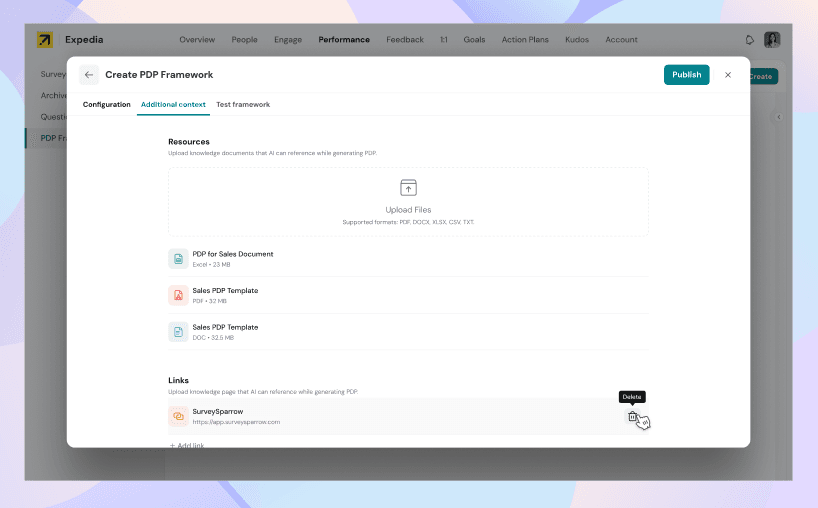
- Documents: Upload relevant reference materials such as policies, role expectations, templates, or development guidelines. We support PDF, DOCX, XLSX, CSV, and TXT file formats.
- Links: Add relevant webpages or knowledge sources that the AI can reference while generating PDPs.
These resources give the AI more context to create relevant, specific, and organization-aligned PDPs.
Step 3: Test Your Framework
Before publishing, you will have provision to test your framework to see how it performs with different employee scenarios.
You can:
- Choose a test persona: Select from predefined employee scenarios to see how the framework generates a PDP for different development needs.
- Describe an employee: Provide a custom employee profile with relevant performance context, strengths, or development areas.
- Preview the PDP: Generate a preview and review how well the framework translates the provided context into a development plan.
Use the preview to validate and refine your framework before making it available for PDP generation.
That's it ! Framework is generated, You can now use this in any active Performance Reviews
How to use PDP Frameworks in Performance Reviews
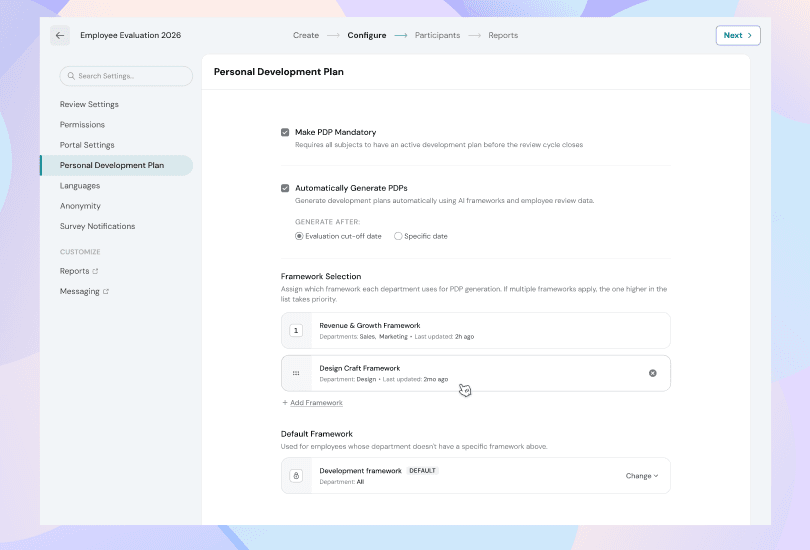
As an Admin, you can choose which PDP frameworks should be used for each Performance Review.
How Framework Selection Works
- Set Framework priority: Arrange frameworks in order of priority. When generating a PDP, ThriveSparrow checks the employee’s department against the frameworks from top to bottom and selects the first matching framework.
- Use a default framework: A default framework is mandatory and is used when an employee doesn’t belong to a department covered by any of the configured frameworks.
- Apply consistently: This ensures every employee is assigned an appropriate framework, while allowing department-specific frameworks to take priority over the default.
Now any AI PDP Generation will go through the relevant framework for an employee and give expected effective PDP output.
Should you need any help, don't hesitate to contact our support team. Happy thriving!