
Setting up a Calibration
Calibration is a part of a Performance Review in Thrivesparrow.
Under Configure section of Review , You should find a sidebar dedicated for Calibration Configuration.
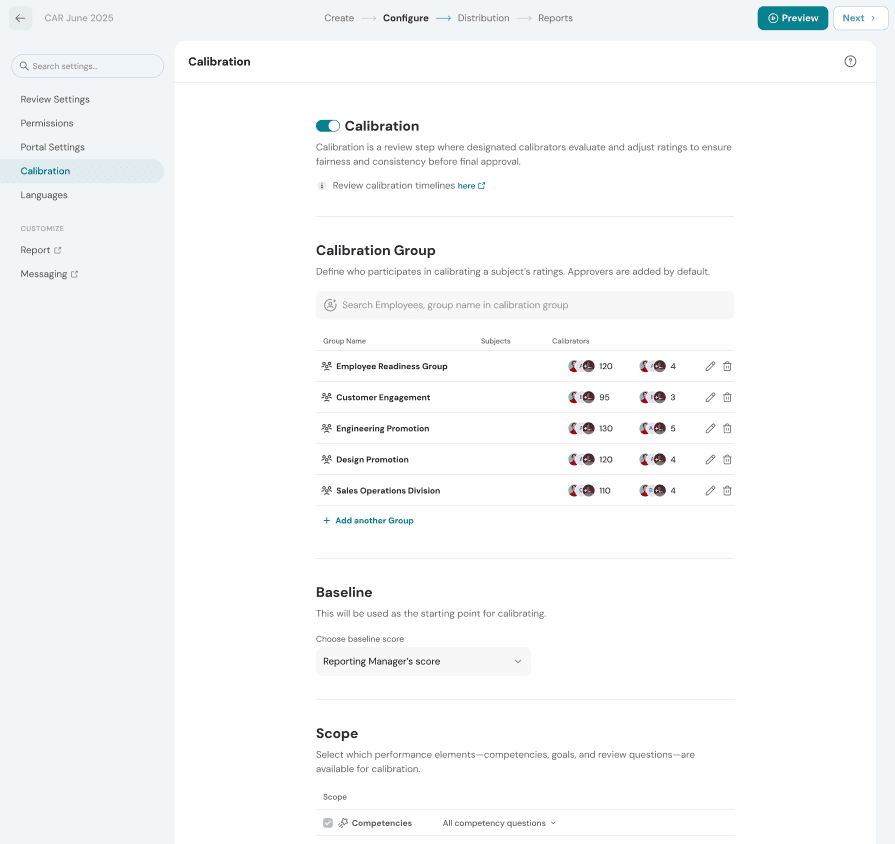
Configuration focuses on bare minimum expectation to start a Calibration process, There are 4 key items
- Enable Calibration for this review
- Calibration Groups
- Baseline Scores
- Scope Questions for Calibration
Enable Calibration for this Review
Calibration can be enabled at any point in time during a live performance Review.
Calibration Groups
Calibration as a process requires a set of people to come together and discuss and finalize scores.
Creating a Calibration Group requires
- Subjects to be involved in the Calibration
- Calibration panel members who will have the access to Finalize the scores
- Review Step for verifying the group participants.
----- Adding Group Image here ---
Baseline Scores
To start the calibration process we need a baseline score to be taken for discussion. In almost all cases it's the manager's score
We have 2 options here.
- Calibration to happen on top of Manger's score ( default )
- Calibration to happen on top of Department head's score.
You can pick as per your organisation setup.
Scope Questions for Calibration
The need of Calibrating all the scores once again isn't ideal, there should be a set of key questions that defines the decision of talent management. For Example,
- Competency Questions only can be considered for Calibration
- A potential vs performance Question can be considered for Calibration
It's an open area which can change based on organisations.