What Are the Different Visibility Options in a Goal
Venkata
March 13, 2025
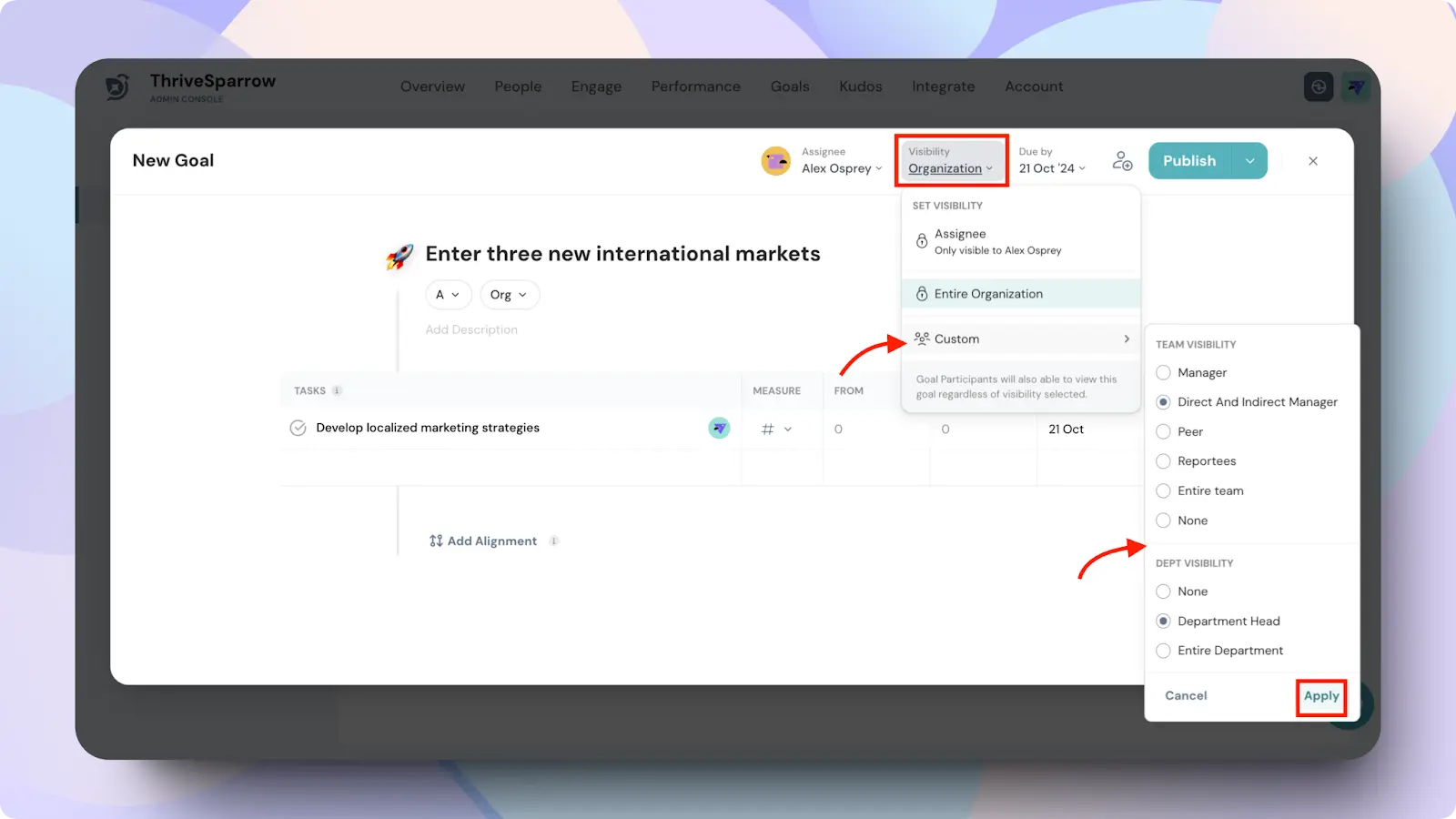
When creating or managing a goal in ThriveSparrow, you have the ability to control who can see and track the goal. Setting visibility options ensures that only the appropriate people have access to view and contribute to the goal’s progress. Below are the different visibility options you can select:
1. Assignee Only
Description: Only the assignee of the goal can view it.
Best for: Personal or highly sensitive goals where access is restricted to the individual responsible for the goal.
2. Entire Organization
Description: The goal is visible to everyone in the organization.
Best for: High-level organizational goals that affect all departments or teams, such as company-wide objectives.
3. Custom Visibility
Custom visibility allows you to define who within your organization has access to the goal. It includes specific options for team and department-level visibility.
Note: Admins will always have access to view the goal, regardless of its visibility settings.
Team Visibility Options:
Manager
The direct manager of the assignee can view the goal.
Direct and Indirect Manager
Both the immediate manager and any indirect managers above them in the hierarchy can view the goal.
Peer
The peers of the assignee within the same team or reporting line can view the goal.
Reportees
The reportees (subordinates) of the assignee can view the goal.
Entire Team
All members of the assignee's team can view the goal.
None
No team visibility is granted, meaning the goal will only be visible to the assignee or any specific participants added.
Department Visibility Options:
Department Head
The department head overseeing the assignee’s department can view the goal.
Entire Department
Everyone within the department of the assignee can view the goal.
None
No department-level visibility is granted. This option keeps the goal hidden from the entire department unless they are direct participants.
Example:
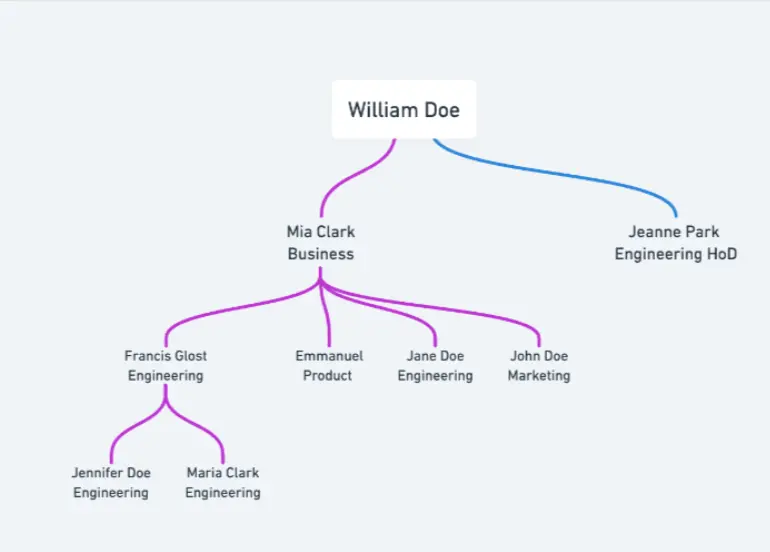
If a goal is assigned to Francis Glost, the following individuals would have visibility based on the team's and department's access settings:
Team Visibilities
Manager: Mia Clark, Francis Glost
Direct and Indirect Manager: Mia Clark, William Doe, Francis Glost
Peers: Emmanuel, Jane Doe, John Doe, Mia Clark, Francis Glost
Reportees: Jennifer Doe, Maria Clark, Mia Clark, Francis Glost
Entire Team: Emmanuel, Jane Doe, John Doe, Jennifer Doe, Maria Clark, Mia Clark, Francis Glost
Department Visibilities
Department Head: Jeanne Park, Francis Glost, Mia Clark
Entire Department: Jennifer Doe, Maria Clark, Jane Doe, Jeanne Park, Francis Glost, Mia Clark
Important Note: Goal Participants
Regardless of the visibility options selected, goal participants (such as Watchers, Contributors, and Managers) will always have visibility to both child and parent goals.
4. Choosing the Right Visibility Option
Selecting the appropriate visibility ensures that the right people have access to the goal without overwhelming others with unnecessary details. Consider who needs to track progress, who is responsible for tasks, and who should be informed about the goal when setting visibility.
Should you need any help, don't hesitate to contact our support team. Happy thriving!